The Guru College
Backups, Revisited
In the months since I posted about backups, I’ve divested myself from CrashPlan and have been backing up the photo library with BackBlaze’s B2 object storage service. I also upgraded my home internet connection to synchronous gigabit fiber, which meant I was able to backup the 3.6 TB of photos in my archive to the cloud in a little less than 3 days. The total cost so far is ~$18/month, which is very reasonable for what I’m storing and how important it is.
It’s been eye opening how much better the management of my data is now that I’m controlling the tools and the files. Even using only the b2 utility, I have far more freedom and control than I ever had with CrashPlan’s client, and I’m secure in the knowledge that my cron jobs work and work correctly.
#!/bin/bash

/usr/bin/find /backups -type f > /backups/contents.txt
/usr/local/bin/b2 sync --noProgress --threads 30 \
    --delete --excludeRegex "^\." /backups \
    b2://<bucket_name>
I’m certain there’s better ways to do this, but considering the time I’ve put into this solution, and the ability to positively affirm it’s working the way I want makes me happy.
Backups
Code 42, the makers of Crashplan, recently announced they were Leaving aside the insane economics of letting users store as much as they can, from up to 10 computers, for $14 a month, and allowing network shares to be backed up, it appears that doing small business backups is a more profitable market. planning to exit the consumer market. Current customers can continue using their subscriptions as long as they are valid, and they are being extended by 60 days in all cases to let people find the exit. As I’m (or, I guess, was?) a Crashplan for Home customer - and have been since at least 2011 - this means I’m in need of a new solution.
As much as I’m tempted by the idea of moving to yet another unlimited at least until we discover the problem with that plan provider, I’m starting to seriously think about using something like ARQ to upload and preserve my datasets to pay-as-you-go cloud storage providers. The best known, of course, is Amazon S3, but there are many others, and ARQ supports a crazy list of them. If I go down this route, I’d also look into something like duplicity or borg to backup my fileserver.
I have something on the order of 6 TB of data I’d like to preserve. The first 1TB is frequently changing data that is critical to be able to recover. The next TB is critical but changes very infrequently, and the rest is my photo archive, which never changes, and is only needed if my house burns down. The appealing part of using ARQ, borg, or duplicity (or tools like them) is the data can be tiered out and costed separately. Multiple versions for rapidly changing datasets in standard S3 buckets, and larger archives in either S3 Infrequent Access, S3 Glacier, or Backblaze B2 storage, as it costs far less, and my access pattern for that data is very different. It looks like I can get my costs to come in close to $35 per month, which is a bitter pill to swallow when compared with my old deal of $14/month, but it’s not going to kill me.
The best part about this plan is that there’s no fear of the providers going away - at least not in the sense that Crashplan has. I’m tempted to look at the Backblaze desktop client itself - $5/computer/month with unlimited data - but that unlimited part worries me. Internet history is littered with the remains of companies that have promised unlimited storage, and have had to either withdraw the plans or fold completely. I’d much rather pay as I go, know where my storage lives, and know how to move it somewhere else when that time comes.
A Fool's Errand
Starting an adventure with an Astoria Argenta SAE-2/XL
After painstaking research, I have recently acquired a used commercial espresso machine. It’s a beauty. A retired machine that was in service for an estimated 10 years is now sitting in my office, challenging me to learn All The Things about the machine, restore it and…
For anyone who doesn’t have perspective on what this machine is, here’s it is, in all it’s glory:

A machine of this class has a certain set of challenges that you don’t find in ordinary home appliances. It’s 220v, and runs at a peak draw of 6325 watts - which means it needs a 30 amp circuit, but would be happier with 40 amps. It uses split-phase and doesn’t touch 110v at all, which makes no sense to most people who deal primarily in 110v applications. In North America, at the service entrance to the house, the current from the pole is broken up into 110v legs that are distributed about the house. The normal execptions to this are the electric clothes dryer and the electric stove. These use both 220v and 110v at the same time, which causes no end of headache for everyone. Even worse, until 1996, it was considered code to use the neutral conductor as a floating ground for these appliances. Modern code states that you will use a four conductor cable with three active lines and a dedicated ground. Because, you know, house fires.
Armed with this, the next step is getting water into the machine. It relies on line pressure to fill the boiler before the heating element is energized, so that has to be dealt with, and you need to wire the pump as well. The boiler itself is 15 liters. The local big-box retailer sells a number of hot water heaters smaller than that. They have limited application, but it stands that they exist as a product that sells in enough quantity to make shelf space a priority.
Further, to keep 4 gallons of water at 1.25 bar above atmospheric, for quick turnaround in a commercial environment, the machine has a 220v 6000W heating element. This may slightly outstrip a home user’s espresso needs by a factor of 60. Even on a busy day, I don’t pull 10 shots out of the La Pavoni, and this machine could easily pull 600 shots in a coffee shop during a work day. So I’m probably going to insulate the boiler to reduce the duty cycle, and I’ve started to look at ways to further reduce the load by adding telemetry to the mix.
I’ve been able to power the machine up to validate everything. Surprisingly, more worked than I expected. The pump is quiet, the sight glass is dirty but functional, both groupheads dispense hot water of correct proportion to the flowmeter settings (which means they are working correctly as well). Boiler auto-fill works, as does auto-cutoff. Anti-vacuum valve works. Steam arms work. Hot water dispenser works. Heating element works. Drains work, and the water comes out clean. Turns out the last user did drain the boiler when putting the machines away, which is good for me. There’s also no sediment, gunk or anything else visible in the water coming out, and it doesn’t have any odor.
I have spent the better part of 12 hours removing the old grouphead gaskets, which were carbonized, and after a replacement, I’ve been able to pull reasonable quality espresso from both heads. I still need to crack the boiler seal and visually inspect the scale buildup, but this machine has all the seriously expensive parts in working order.
I guess the next steps are to decide where to actually install it and then call a plumber to help work out water and drain lines, and an electrician to put the right socket in the right place.
Speaking At SurgeCon 2016
Earlier this year I submitted a talk proposal to http://surge.omniti.com/2016 SurgeCon, based on the work I have been doing scaling the log searching infrastructure at work. I was notified recently that my proposal has been accepted, and I’m going to be http://surge.omniti.com/2016#BreandanDezendorf speaking!
It’s been a long an interesting road going from 30,000 to 200,000+ logs per second, as well as replacing or upgrading almost every piece of the logging infrastructure from pipelines to data storage to presentation. There were some nasty bumps along the way, as when the index of logs is measured in the hundreds of billions scaling limitations come in to play quickly - and we’re on track to be at or near a trillion logs in the search indexes in the coming months.
Registration is open at the moment, but the early bird pricing goes away soon, so if you are interested, sign up!
I'm Never Sleeping Again
Life Begins At 8 Bar
In the past few months, my morning routine has changed. Instead of firing up the kettle and grinding out ~25 grams of coarse coffee, I’m find myself praying that my son has turned the rocker switch so I can begin the ritual of the manual espresso machine.
My wonderful wife found, quite by accident, a La Pavoni Europiccola Millenium in almost mint condition for $20. These machines are quite picky about almost everything - the grind of the bean, distribution in the basket, the humidity of the air, the level of water in the boiler, and then of course the temperature of the boiler, grouphead, portafilter and cup. This is before we even get to steaming milk – and I’ve skipped several important considerations that I won’t bore you with now.
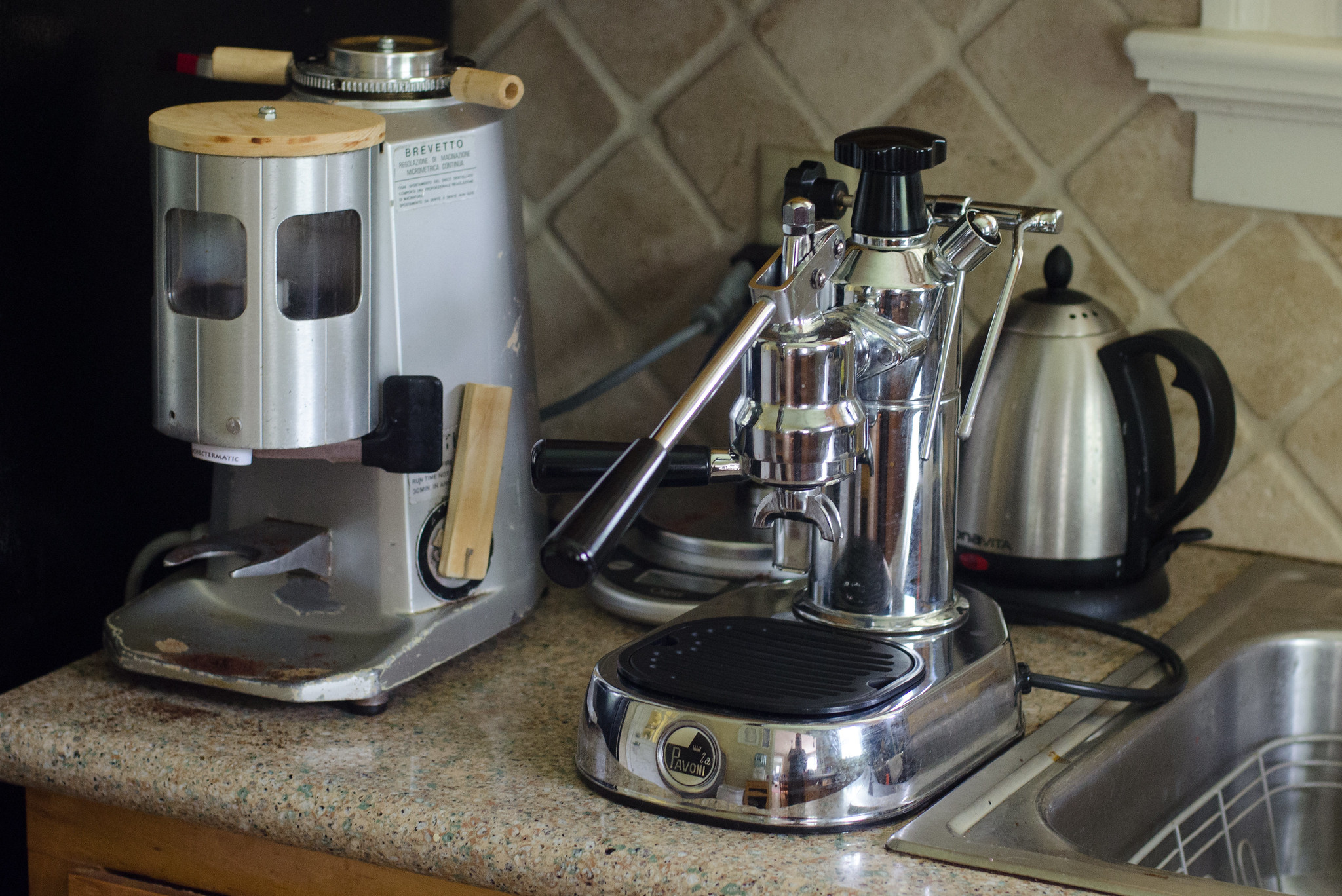
I’ve learned more in the last few months about the picky little details of espresso making than I ever thought I’d know. I purchased a used espresso grinder for 10 times what we paid for the Pavoni, and it would still have been a deal at 2x the price. We’re into gear (cups, steaming pitchers, tampers, you name it) up to our elbows, and we’re almost where we need to be. Drinks are consistently good, at times rising to the level of actual excellence.
I can’t lie and say we’re saving any money compared to our hipster pour over days. Before this I was drinking my coffee black, and the quality of the bean was far less important. Now, we run through a little over 3 gallons of milk and 2 pounds of coffee a week, considering our needs and the needs of our guests. But my latte’s cost about a dollar ten a cup in consumables, and even when amortizing the cost of the hardware, we’re looking at $1.50 a cup if we stopped tomorrow.
And there’s something that’s just delightful about watching the syrupy caffeinated magic flow into a waiting cup.
Job Transitions and Loadbalancers
The most recent Practical Operations Podcast episodes are about http://operations.fm/episodes/11 job transitions and load balancers, http://operations.fm/episodes/12 both things near and dear to our hearts. Give a listen, let me know what you think! We’d like to know what we should cover better - so topic ideas are always welcome - and what we’ve covered poorly, so comments are encouraged.
XML feed
With the move from Wordpress to Hugo, the RSS feed for this site has changed to something more universally understood and common place: http://gurucollege.net/index.xml The old address of http://gurucollege.net/blog/?feed=rss2 will still work for some time, but should go away soon.
Home | Older Posts